> ## Documentation Index
> Fetch the complete documentation index at: https://docs.aurigin.ai/llms.txt
> Use this file to discover all available pages before exploring further.
# Quickstart
> Detect AI generated audio in seconds with only a few lines of code
## 1) Get an API key
Create an account and generate an [API key in your dashboard](https://aurigin.ai/app/dashboard/api).
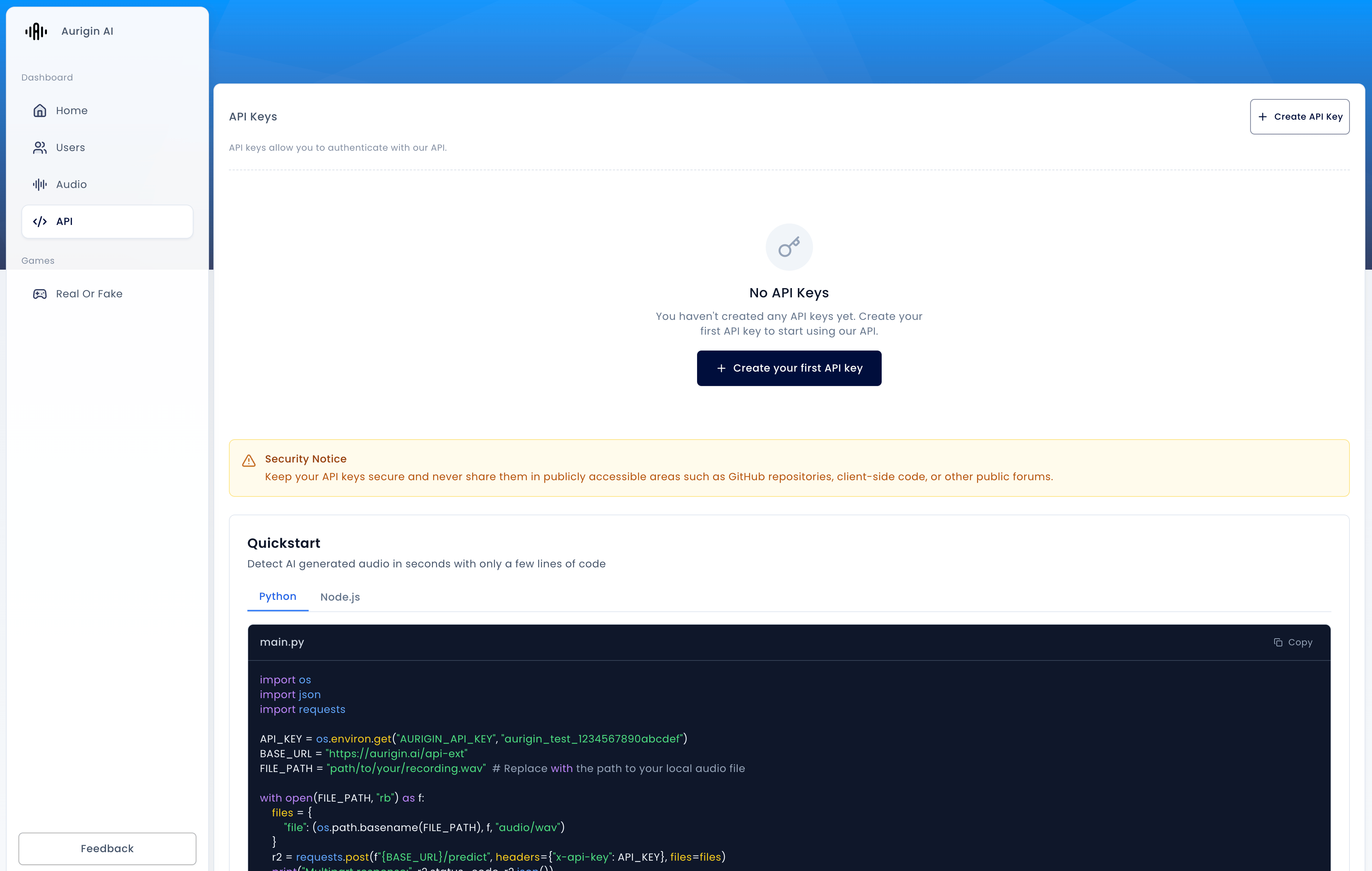 Add it to an environment variable:
```bash theme={null}
export AURIGIN_API_KEY=aurigin_test_1234567890abcdef
```
## 2) Upload a file and get a prediction
Send your audio file directly to `POST /predict`. The API processes your audio in 5-second segments and returns both a global verdict and per-segment results.
```python Python theme={null}
import os
import json
import requests
API_KEY = os.environ.get("AURIGIN_API_KEY", "aurigin_test_1234567890abcdef")
BASE_URL = "https://api.aurigin.ai/v1"
FILE_PATH = "path/to/your/recording.wav" # Replace with the path to your local audio file
with open(FILE_PATH, "rb") as f:
files = {
"file": (os.path.basename(FILE_PATH), f, "audio/wav")
}
r2 = requests.post(f"{BASE_URL}/predict", headers={"x-api-key": API_KEY}, files=files)
print("Multipart response:", r2.status_code, r2.json())
# The response contains predictions for each 5-second chunk of your audio
# For a 15-second file, you'll get 3 predictions: ["fake", "real", "fake"]
```
```javascript Node.js theme={null}
// Node.js 18+
import { readFile } from "node:fs/promises";
import path from "node:path";
const API_KEY = process.env.AURIGIN_API_KEY || 'aurigin_test_1234567890abcdef'
const BASE_URL = 'https://api.aurigin.ai/v1'
const FILE_PATH = 'path/to/your/recording.mp3' // Replace with your local audio file path
const buf = await readFile(FILE_PATH);
const form = new FormData();
form.append("file", new File([buf], path.basename(FILE_PATH), { type: "audio/mpeg" }));
const blob = await new Response(form).blob();
const resp = await fetch(`${BASE_URL}/predict`, {
method: "POST",
headers: {
"x-api-key": API_KEY,
"Content-Type": blob.type,
"Content-Length": String(blob.size),
},
body: blob,
});
if (!resp.ok) {
console.error('Request failed:', resp.status, await resp.text())
} else {
console.log('Multipart response:', await resp.json())
// The response contains predictions for each 5-second chunk of your audio
// For a 15-second file, you'll get 3 predictions: ["fake", "real", "fake"]
}
```
## 3) Voice ID: Enroll and Verify
Voice ID adds identity verification on top of deepfake detection. First, enroll a user's voice to create a voiceprint, then verify if future voice samples match.
### Enroll a Voice
Create a voiceprint from a clean voice sample (>= 10 seconds):
```python Python theme={null}
import os
import json
import requests
API_KEY = os.environ.get("AURIGIN_API_KEY", "aurigin_test_1234567890abcdef")
BASE_URL = "https://api.aurigin.ai/v1"
ENROLLMENT_FILE = "path/to/user_voice_enrollment.wav" # >= 10 seconds
with open(ENROLLMENT_FILE, "rb") as f:
files = {"audio_file": (os.path.basename(ENROLLMENT_FILE), f, "audio/wav")}
data = {"user_id": "john_doe"}
response = requests.post(
f"{BASE_URL}/voiceid/enroll",
headers={"x-api-key": API_KEY},
files=files,
data=data
)
result = response.json()
embedding_vector = result["embedding"]
# Store the embedding vector securely for future verification
print(f"Enrollment successful! Embedding dimension: {len(embedding_vector)}")
print(f"Model: {result['model_version']}")
print(f"Processing time: {result['processing_time']:.2f}s")
# Save embedding for later use
with open("user_voiceprint.json", "w") as out:
json.dump(embedding_vector, out)
```
```javascript Node.js theme={null}
import { readFile } from "node:fs/promises";
import path from "node:path";
import FormData from "form-data";
import fs from "fs";
const API_KEY = process.env.AURIGIN_API_KEY || 'aurigin_test_1234567890abcdef'
const BASE_URL = 'https://api.aurigin.ai/v1'
const ENROLLMENT_FILE = 'path/to/user_voice_enrollment.wav' // >= 10 seconds
const form = new FormData();
form.append('audio_file', fs.createReadStream(ENROLLMENT_FILE));
form.append('user_id', 'john_doe');
const response = await fetch(`${BASE_URL}/voiceid/enroll`, {
method: 'POST',
headers: {
'x-api-key': API_KEY,
...form.getHeaders()
},
body: form
});
const result = await response.json();
const embeddingVector = result.embedding;
console.log(`Enrollment successful! Embedding dimension: ${embeddingVector.length}`);
console.log(`Model: ${result.model_version}`);
console.log(`Processing time: ${result.processing_time.toFixed(2)}s`);
// Save embedding for later use
await fs.promises.writeFile(
'user_voiceprint.json',
JSON.stringify(embeddingVector)
);
```
### Verify a Voice
Compare a new voice sample against the enrolled voiceprint:
```python Python theme={null}
import os
import json
import requests
API_KEY = os.environ.get("AURIGIN_API_KEY", "aurigin_test_1234567890abcdef")
BASE_URL = "https://api.aurigin.ai/v1"
VERIFICATION_FILE = "path/to/verification_sample.wav"
# Load the stored embedding vector
with open("user_voiceprint.json", "r") as f:
embedding_vector = json.load(f)
with open(VERIFICATION_FILE, "rb") as f:
files = {"audio_file": (os.path.basename(VERIFICATION_FILE), f, "audio/wav")}
data = {
"voice_vector": json.dumps(embedding_vector),
"user_id": "john_doe"
}
response = requests.post(
f"{BASE_URL}/voiceid/verify",
headers={"x-api-key": API_KEY},
files=files,
data=data
)
result = response.json()
print(f"Is Match: {result['is_match']}")
print(f"Similarity Score: {result['similarity_score']:.2%}")
print(f"Confidence Score: {result['confidence_score']:.2%}")
print(f"Model Version: {result['model_version']}")
print(f"Processing Time: {result['processing_time']:.2f}s")
if result['deepfake_score'] is not None:
print(f"Deepfake Score: {result['deepfake_score']:.2%}")
# Make authentication decision
if result['is_match'] and result['similarity_score'] >= 0.85:
print("✅ Authentication successful!")
else:
print("❌ Authentication failed - require additional verification")
```
```javascript Node.js theme={null}
import { readFile } from "node:fs/promises";
import FormData from "form-data";
import fs from "fs";
const API_KEY = process.env.AURIGIN_API_KEY || 'aurigin_test_1234567890abcdef'
const BASE_URL = 'https://api.aurigin.ai/v1'
const VERIFICATION_FILE = 'path/to/verification_sample.wav'
// Load the stored embedding vector
const embeddingVector = JSON.parse(
await fs.promises.readFile('user_voiceprint.json', 'utf8')
);
const form = new FormData();
form.append('audio_file', fs.createReadStream(VERIFICATION_FILE));
form.append('voice_vector', JSON.stringify(embeddingVector));
form.append('user_id', 'john_doe');
const response = await fetch(`${BASE_URL}/voiceid/verify`, {
method: 'POST',
headers: {
'x-api-key': API_KEY,
...form.getHeaders()
},
body: form
});
const result = await response.json();
console.log(`Is Match: ${result.is_match}`);
console.log(`Similarity Score: ${(result.similarity_score * 100).toFixed(2)}%`);
console.log(`Confidence Score: ${(result.confidence_score * 100).toFixed(2)}%`);
console.log(`Model Version: ${result.model_version}`);
console.log(`Processing Time: ${result.processing_time.toFixed(2)}s`);
if (result.deepfake_score !== null) {
console.log(`Deepfake Score: ${(result.deepfake_score * 100).toFixed(2)}%`);
}
// Make authentication decision
if (result.is_match && result.similarity_score >= 0.85) {
console.log('✅ Authentication successful!');
} else {
console.log('❌ Authentication failed - require additional verification');
}
```
## Errors
Check your API key and file size before making requests.
| Code | Description |
| ----- | ----------------------------------------- |
| `400` | Invalid input or file too large |
| `403` | Authentication failed (check `x-api-key`) |
| `500` | Internal error or upstream unavailability |
## Next Steps
Learn more about detecting AI-generated audio
Explore voice enrollment and verification
Add it to an environment variable:
```bash theme={null}
export AURIGIN_API_KEY=aurigin_test_1234567890abcdef
```
## 2) Upload a file and get a prediction
Send your audio file directly to `POST /predict`. The API processes your audio in 5-second segments and returns both a global verdict and per-segment results.
```python Python theme={null}
import os
import json
import requests
API_KEY = os.environ.get("AURIGIN_API_KEY", "aurigin_test_1234567890abcdef")
BASE_URL = "https://api.aurigin.ai/v1"
FILE_PATH = "path/to/your/recording.wav" # Replace with the path to your local audio file
with open(FILE_PATH, "rb") as f:
files = {
"file": (os.path.basename(FILE_PATH), f, "audio/wav")
}
r2 = requests.post(f"{BASE_URL}/predict", headers={"x-api-key": API_KEY}, files=files)
print("Multipart response:", r2.status_code, r2.json())
# The response contains predictions for each 5-second chunk of your audio
# For a 15-second file, you'll get 3 predictions: ["fake", "real", "fake"]
```
```javascript Node.js theme={null}
// Node.js 18+
import { readFile } from "node:fs/promises";
import path from "node:path";
const API_KEY = process.env.AURIGIN_API_KEY || 'aurigin_test_1234567890abcdef'
const BASE_URL = 'https://api.aurigin.ai/v1'
const FILE_PATH = 'path/to/your/recording.mp3' // Replace with your local audio file path
const buf = await readFile(FILE_PATH);
const form = new FormData();
form.append("file", new File([buf], path.basename(FILE_PATH), { type: "audio/mpeg" }));
const blob = await new Response(form).blob();
const resp = await fetch(`${BASE_URL}/predict`, {
method: "POST",
headers: {
"x-api-key": API_KEY,
"Content-Type": blob.type,
"Content-Length": String(blob.size),
},
body: blob,
});
if (!resp.ok) {
console.error('Request failed:', resp.status, await resp.text())
} else {
console.log('Multipart response:', await resp.json())
// The response contains predictions for each 5-second chunk of your audio
// For a 15-second file, you'll get 3 predictions: ["fake", "real", "fake"]
}
```
## 3) Voice ID: Enroll and Verify
Voice ID adds identity verification on top of deepfake detection. First, enroll a user's voice to create a voiceprint, then verify if future voice samples match.
### Enroll a Voice
Create a voiceprint from a clean voice sample (>= 10 seconds):
```python Python theme={null}
import os
import json
import requests
API_KEY = os.environ.get("AURIGIN_API_KEY", "aurigin_test_1234567890abcdef")
BASE_URL = "https://api.aurigin.ai/v1"
ENROLLMENT_FILE = "path/to/user_voice_enrollment.wav" # >= 10 seconds
with open(ENROLLMENT_FILE, "rb") as f:
files = {"audio_file": (os.path.basename(ENROLLMENT_FILE), f, "audio/wav")}
data = {"user_id": "john_doe"}
response = requests.post(
f"{BASE_URL}/voiceid/enroll",
headers={"x-api-key": API_KEY},
files=files,
data=data
)
result = response.json()
embedding_vector = result["embedding"]
# Store the embedding vector securely for future verification
print(f"Enrollment successful! Embedding dimension: {len(embedding_vector)}")
print(f"Model: {result['model_version']}")
print(f"Processing time: {result['processing_time']:.2f}s")
# Save embedding for later use
with open("user_voiceprint.json", "w") as out:
json.dump(embedding_vector, out)
```
```javascript Node.js theme={null}
import { readFile } from "node:fs/promises";
import path from "node:path";
import FormData from "form-data";
import fs from "fs";
const API_KEY = process.env.AURIGIN_API_KEY || 'aurigin_test_1234567890abcdef'
const BASE_URL = 'https://api.aurigin.ai/v1'
const ENROLLMENT_FILE = 'path/to/user_voice_enrollment.wav' // >= 10 seconds
const form = new FormData();
form.append('audio_file', fs.createReadStream(ENROLLMENT_FILE));
form.append('user_id', 'john_doe');
const response = await fetch(`${BASE_URL}/voiceid/enroll`, {
method: 'POST',
headers: {
'x-api-key': API_KEY,
...form.getHeaders()
},
body: form
});
const result = await response.json();
const embeddingVector = result.embedding;
console.log(`Enrollment successful! Embedding dimension: ${embeddingVector.length}`);
console.log(`Model: ${result.model_version}`);
console.log(`Processing time: ${result.processing_time.toFixed(2)}s`);
// Save embedding for later use
await fs.promises.writeFile(
'user_voiceprint.json',
JSON.stringify(embeddingVector)
);
```
### Verify a Voice
Compare a new voice sample against the enrolled voiceprint:
```python Python theme={null}
import os
import json
import requests
API_KEY = os.environ.get("AURIGIN_API_KEY", "aurigin_test_1234567890abcdef")
BASE_URL = "https://api.aurigin.ai/v1"
VERIFICATION_FILE = "path/to/verification_sample.wav"
# Load the stored embedding vector
with open("user_voiceprint.json", "r") as f:
embedding_vector = json.load(f)
with open(VERIFICATION_FILE, "rb") as f:
files = {"audio_file": (os.path.basename(VERIFICATION_FILE), f, "audio/wav")}
data = {
"voice_vector": json.dumps(embedding_vector),
"user_id": "john_doe"
}
response = requests.post(
f"{BASE_URL}/voiceid/verify",
headers={"x-api-key": API_KEY},
files=files,
data=data
)
result = response.json()
print(f"Is Match: {result['is_match']}")
print(f"Similarity Score: {result['similarity_score']:.2%}")
print(f"Confidence Score: {result['confidence_score']:.2%}")
print(f"Model Version: {result['model_version']}")
print(f"Processing Time: {result['processing_time']:.2f}s")
if result['deepfake_score'] is not None:
print(f"Deepfake Score: {result['deepfake_score']:.2%}")
# Make authentication decision
if result['is_match'] and result['similarity_score'] >= 0.85:
print("✅ Authentication successful!")
else:
print("❌ Authentication failed - require additional verification")
```
```javascript Node.js theme={null}
import { readFile } from "node:fs/promises";
import FormData from "form-data";
import fs from "fs";
const API_KEY = process.env.AURIGIN_API_KEY || 'aurigin_test_1234567890abcdef'
const BASE_URL = 'https://api.aurigin.ai/v1'
const VERIFICATION_FILE = 'path/to/verification_sample.wav'
// Load the stored embedding vector
const embeddingVector = JSON.parse(
await fs.promises.readFile('user_voiceprint.json', 'utf8')
);
const form = new FormData();
form.append('audio_file', fs.createReadStream(VERIFICATION_FILE));
form.append('voice_vector', JSON.stringify(embeddingVector));
form.append('user_id', 'john_doe');
const response = await fetch(`${BASE_URL}/voiceid/verify`, {
method: 'POST',
headers: {
'x-api-key': API_KEY,
...form.getHeaders()
},
body: form
});
const result = await response.json();
console.log(`Is Match: ${result.is_match}`);
console.log(`Similarity Score: ${(result.similarity_score * 100).toFixed(2)}%`);
console.log(`Confidence Score: ${(result.confidence_score * 100).toFixed(2)}%`);
console.log(`Model Version: ${result.model_version}`);
console.log(`Processing Time: ${result.processing_time.toFixed(2)}s`);
if (result.deepfake_score !== null) {
console.log(`Deepfake Score: ${(result.deepfake_score * 100).toFixed(2)}%`);
}
// Make authentication decision
if (result.is_match && result.similarity_score >= 0.85) {
console.log('✅ Authentication successful!');
} else {
console.log('❌ Authentication failed - require additional verification');
}
```
## Errors
Check your API key and file size before making requests.
| Code | Description |
| ----- | ----------------------------------------- |
| `400` | Invalid input or file too large |
| `403` | Authentication failed (check `x-api-key`) |
| `500` | Internal error or upstream unavailability |
## Next Steps
Learn more about detecting AI-generated audio
Explore voice enrollment and verification